
WHIP Hub: The Intelligent Backbone of the Smart Home
The Bridge Between Worlds
In our article about WHIP Nodes, we introduced the "nerve cells" of the WHIP system - small, specialized microcontrollers that control sensors and actuators in real-time and communicate with each other. But how do these Nodes communicate with the outside world? How is their data aggregated, analyzed, and linked with other systems?
The answer: WHIP Hubs.
A WHIP Hub is a Raspberry Pi-based minicomputer that acts as intelligent middleware between the hardware-level Nodes and the higher-level server. It translates between the real-time world of CAN bus communication and the networked world of the internet.
A fundamental design principle applies: Higher intelligence is always an addition, never a prerequisite. The base layer - Nodes that read sensors and control actuators - operates completely autonomously. The Hub adds convenience, analysis, and connectivity, but is not required for basic operation.
Hardware Foundation
Base Platform
The current standard for WHIP Hubs is a Raspberry Pi 4B with 8 GB RAM. For more demanding tasks like multiroom audio or local AI processing, we also use the Raspberry Pi 5 with 16 GB RAM.
The compact form factor with passive cooling (we use Geekworm heatsinks for the Pi 4 and EDATEC enclosures for the Pi 5) allows installation in electrical cabinets or discreet placement in living spaces. A Hub typically consumes 5-10 watts - less than an LED bulb.
Why Raspberry Pi?
Choosing the Raspberry Pi as the Hub platform is an economic decision. For tasks requiring TCP/IP networking, complex protocol stacks, or several gigabytes of working memory, a full-fledged Linux computer is the better choice:
| Platform | Price | RAM | Network | Ecosystem |
|---|---|---|---|---|
| STM32H7 (High-End MCU) | ~€30 | 1 MB | Optional, complex | Bare Metal/RTOS |
| Raspberry Pi 4B | ~€50 | 8,000 MB | Gigabit + WiFi | Complete Linux |
The Raspberry Pi brings a complete ecosystem: Python, Perl, Node.js, Docker, databases - whatever you need. Development is faster, debugging is easier, and there's a huge community with solutions for almost every problem.
For time-critical tasks in the microsecond range, STM32 Nodes are the right choice. For everything else, the Pi is not just adequate but superior.
Expansion via HATs
The real magic comes from specialized expansion boards (HATs - Hardware Attached on Top):
Waveshare Dual-CAN HAT
The heart of Node communication. This HAT provides two galvanically isolated CAN bus channels with 120Ω termination resistors (jumper-selectable). Technical specifications:
- 2 independent CAN channels (can0, can1)
- 1 Mbit/s transfer rate
- MCP2515 CAN controller with SPI connection
- Galvanic isolation for noise immunity
- Up to 20m bus length per channel, 30 participants
A single Hub can thus manage up to 60 WHIP Nodes over a total distance of 40 meters. The flexible topology allows various configurations:
Hub at the end:        Hub in the middle:

|---20m---Hub          |--10m--Hub--10m--|
|---20m---|            |--10m--|  |--10m--|
ATX LED DALI HAT
For professional lighting control according to the DALI standard (Digital Addressable Lighting Interface). A DALI bus can address up to 64 participants; with a 4-channel HAT we achieve 256 individually controllable luminaires.
Important: DALI is a standalone system. The luminaires work without a Hub - the Hub merely adds intelligent control functions (more on this later).
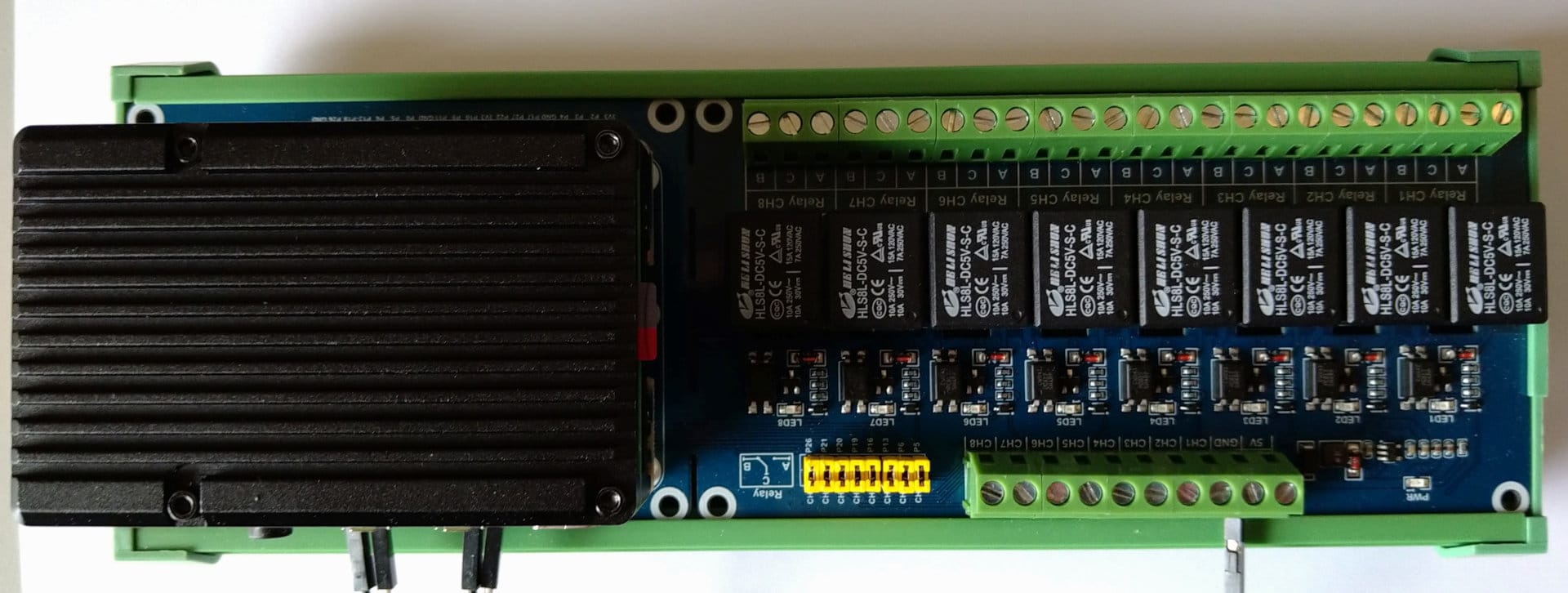
Waveshare 8-Relay HAT
Eight potential-free switching outputs for direct control tasks. Each relay can switch up to 5A at 250V AC or 30V DC. Typical applications:
- Irrigation valves
- Garage doors
- Heating circuit distributors
- Pumps and fans
HiFiBerry ADC8x / DAC8x (Pi 5 only)
For multiroom audio applications: 8-channel audio input or output in studio quality. The Pi 5 has enough processing power for real-time audio processing, room correction, and streaming.
The CAN Bus Bridge
The WHIP CAN Protocol
WHIP Nodes communicate via CAN bus using a custom protocol. The 29-bit Extended CAN IDs are used as follows:
Bit [28:19]  Reserved (10 bits)
Bit [18:7]   Command (12 bits) = Module (8 bits) + Subcommand (4 bits)
Bit [6:0]    Node-ID (7 bits)
This structure enables:
- 256 modules (sensor types, actuator types, system functions)
- 16 subcommands per module (queries, settings, configuration...)
- 128 Nodes per bus (theoretically; practically ~30 due to electrical limits)
The 8 bytes of payload per CAN frame contain the actual parameters - measured values, setpoints, configuration settings. For larger data volumes, a multi-frame protocol exists.
The Identification Ceremony
At startup, the Hub performs an "identification ceremony":
- Broadcast "All report!" - The Hub sends a call to all Nodes
- Nodes respond - Each active Node reports its ID (derived from the unique hardware UUID of the STM32)
- Individual queries - The Hub asks each reported Node about its capabilities
- Participant list distribution - The Hub sends the complete list of all Nodes to all participants
This ceremony is performed at Hub startup and repeated when Nodes are added or removed. The Nodes store the participant list - either in the internal flash of the STM32 or on external FRAM/EEPROM.
Why do Nodes store the list of their peers? Because of GANGLION - the ability of Nodes to communicate with each other even without a Hub (described in detail in the article about WHIP Nodes).
The Hub uploads GANGLION scripts to the Nodes and adds higher intelligence: more complex logic, schedules, weather dependency, notifications. But it is not necessary for basic operation.
Protocol Bridges: The Languages of Home Technology
Modern home technology speaks many protocols. WHIP Hubs translate between these worlds.
Modbus: Profile-Based Device Integration
Modbus is the Esperanto of industrial automation - a protocol from the 1970s that is still implemented in virtually every professional device. The Hub masters both variants:
- Modbus TCP - Over Ethernet, for network-capable devices
- Modbus RTU - Over serial interface (RS-485), for older devices
The WHIP implementation supports 17 of the 21 Modbus function codes and has been validated with over 800 tests.
What's special: There is no hard-coded support for specific manufacturers. Instead, WHIP uses a profile-based system.
The Profile Concept
Each Modbus device is described by a YAML file - its "profile". These profiles define:
- Which registers exist
- What data type they have (uint16, int32, float32...)
- How to interpret the raw values (scaling, units)
- At what intervals they should be polled
The generic WhipHub::Model::Device::Modbus class interprets these profiles at runtime. It knows nothing about Victron, nothing about ventilation systems, nothing about battery management systems - it reads YAML and speaks Modbus.
# Example: vendor/victron/multiplus_ii.yaml
modbus:
  type: tcp
  default_port: 502
  registers:
    ac_input_voltage:
      address: 3
      type: uint16
      scale: 0.1
      unit: V
    ac_input_power:
      address: 12
      type: int16
      unit: W
    battery_soc:
      address: 843
      type: uint16
      unit: "%"
Advantages of the Profile-Based Approach
1. No programming for new devices
Have a new Modbus device? Create a YAML file with the register map from the datasheet. Done. No Perl class, no compilation, no code review.
2. Immediate activation
Profiles are loaded at runtime. Changes take effect after a configuration reload - without restarting the system.
3. OEM devices handled trivially
The same inverter is sold under five different brand names? One line per alias:
# vendor/noname_solar/hybrid_5000.yaml
isa: vendor/victron/multiplus_ii   # Same device, different name
4. Community contributions
Profiles are easier to create than code. An end user can integrate their device themselves and share the profile with others.
Existing Device Profiles
The included profile library includes, among others:
| Category | Examples | Registers |
|---|---|---|
| Inverters | Victron MultiPlus/Quattro, SMA, Fronius | 50-200 |
| Battery storage | ECS BMS, Pylontech, Seplos | 100-400 |
| Ventilation | Vents recuperators, Zehnder | 30-80 |
| Heat pumps | Various | 60-150 |
| Energy meters | Eastron SDM, Carlo Gavazzi | 40-100 |
This list is not exhaustive - it only shows which profiles already exist. The system is designed for devices we don't know about yet.
DALI: Light with Intelligence
DALI (Digital Addressable Lighting Interface) is the standard for professional lighting control. A two-wire bus through which up to 64 luminaires can be individually controlled.
Important to understand: DALI luminaires work independently. Each luminaire has its own address and responds directly to DALI commands. The Hub is not required for basic operation.
What the Hub adds is higher intelligence:
- Presence simulation - During vacation or absence, the Hub switches lights on and off according to realistic patterns to simulate presence
- Usage logging - Which lights are on for how long? Where is energy being wasted?
- Dashboard integration - Overview of all luminaires, remote control via app
- Forgetfulness assistant - Notification when lights are on unnecessarily, option for remote shutdown
- Scene control - Complex lighting moods with a single command
- Schedules - Automatic dimming at bedtime, wake-up light in the morning
In our flagship installation, we go even further: There, the luminaires are DC-based and directly connected to the battery storage. Even in a complete grid failure, the lighting works - but that's material for a separate case study.
MQTT: The Lingua Franca of IoT
MQTT (Message Queuing Telemetry Transport) is the standard protocol for IoT communication. The Hub can function both as an MQTT client and as a broker.
Typical integrations:
- Home Assistant - The Hub publishes sensor data, Home Assistant reacts to it
- Node-RED - Visual programming of automation flows
- InfluxDB + Grafana - Long-term data collection and visualization
- Custom applications - Any software that speaks MQTT
SNMP: Network Monitoring
Simple Network Management Protocol - the standard for monitoring network devices. The Hub can:
- Monitor routers and switches (bandwidth, errors, temperature)
- Query UPS status (battery charge, load, autonomy time)
- Integrate printers and other network devices
The Channel Architecture: Gateway to the World
Philosophy: Generic for the Unforeseen
WHIP was developed with a special philosophy: The system should be able to fulfill tasks that we as developers never foresaw.
A smart home is not an isolated system. It exists in a networked world full of services, APIs, and platforms. The "channel architecture" of the Hub enables integration with over 30 external services - and the list is growing.
Overview of Available Channels
Artificial Intelligence
- Anthropic Claude - For natural language interfaces and intelligent analysis
- Ollama - Local LLM models without cloud dependency
- OpenWebUI - Web interface for local AI
Cloud Platforms
- AWS - Amazon Web Services for scaling and backup
- Azure - Microsoft Cloud Services
Communication & Social Media
- Discord - Notifications and control via chat
- X/Twitter - Post status updates (yes, really!)
- Reddit - Automated posts
- IRC - Classic chat protocol
- Gmail - Email notifications
Home Network
- FritzBox - Presence detection via WiFi devices, call log
- UniFi - Network monitoring for Ubiquiti infrastructure
- OpenMediaVault - NAS monitoring
Energy & Solar
- Victron VRM - Cloud connection for Victron systems
- PVGIS - Solar yield forecast based on weather data
Media & Surveillance
- Kodi - Media center control
- ZoneMinder - Video surveillance
Storage & Databases
- Nextcloud - File synchronization and calendar
- ownCloud - Alternative cloud storage solution
- InfluxDB - Time series database for sensor data
Infrastructure
- Proxmox - Monitor virtualization platform
- Teltonika - Mobile routers (LTE/5G backup)
Cryptocurrencies
- Bitcoin/Altcoins - Wallet monitoring, price queries
Development & Documentation
- GitLab - CI/CD integration, issue tracking
- MediaWiki - Automatic documentation
- TicketSystem - Support workflows
Examples of Channel Usage
The channels enable scenarios that seem absurd at first glance - but are exactly right for someone:
"Post my solar yield on Twitter"
trigger: daily_at_sunset
action:
  channel: x
  message: "Today generated: {{ pv_daily_yield }} kWh ☀️"
"Notify me on Discord when the washing machine is done"
trigger: power_drop
  device: washing_machine
  below: 5W
  for: 2min
action:
  channel: discord
  message: "@here Laundry is done! 🧺"
"Turn on the light when my phone connects to WiFi"
trigger: fritzbox_device_connected
  mac: "AA:BB:CC:DD:EE:FF"
action:
  dali: hallway_ceiling
  brightness: 80%
Summary
WHIP Hubs are the intelligent link between the real-time world of sensors and actuators and the networked world of modern IT systems:
- CAN-Ethernet bridge for up to 60 Nodes per Hub
- Node management with identification ceremony and GANGLION upload
- Protocol translator for Modbus, DALI, MQTT, SNMP
- Integration gateway to 30+ external services
- Data-driven - configuration instead of programming
- Fault-tolerant through hierarchical redundancy
The principle always applies: The Hub adds intelligence but is never a prerequisite for basic operation. A WHIP system works even when everything except the Nodes fails.
In the following articles in the series, we will present concrete use cases - from photovoltaic monitoring to intelligent ventilation control to resilient DC lighting.
This article is part of our series on the WHIP smart home system. Other articles: [WHIP Nodes: The Smartest Nodes in the Smart Home]